| Note | ||
|---|---|---|
| ||
The steps below require you to meet either one of the two conditions below...
If you are visiting from an eduroam participating institution, you can connect to the eduroam wireless network. If none of the above apply to you, please visit the UCCS-Guest information page. |
Step 1: Open Network Connections
Click the networking icon in the system tray, typically located in the lower right side of the screen.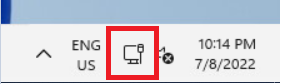
...