Sophos is the anti-virus software used by OIT on all imaged Macs. To update Sophos, follow the instructions below.
Step 1: Open Sophos Endpoint
In the top right corner of the desktop, locate the shield icon with the S in it and double click on it.

This will a open a message box saying "Your computer is protected". Underneath the message, click Open Sophos Endpoint.

This will open the Sophos Endpoint application on your desktop.
Step 2: Update Sophos Endpoint.
In the bottom right corner of the main page, click About.
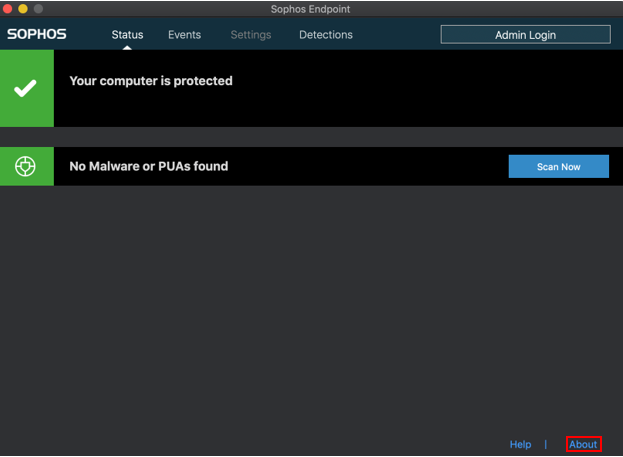
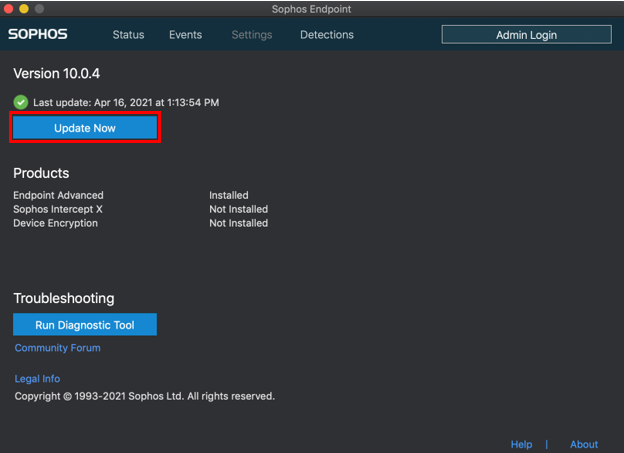
This will pull up a page similar to the one below. Click Update Now to start checking for updates in Sophos.
Step 3: Verify Sophos Has Been Updated
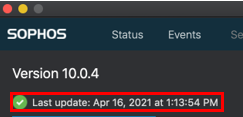
Above the Update Now button, Sophos should say Last update: followed by the date, meaning it has successfully updated.
If you encounter any issues or would like assistance, please reach out to OIT at https://uccs.edu/oit/get-help.