
Description
This KB article aims to assist a conference room owner with obtaining technology support for their space. Since most rooms upgraded as a part of the Conference Room Project are unsupported from the perspective of UCCS OIT, additional support must be requested through the AV Installation Integrator, AVI-SPL. If you notice an issue with your space, please first reach out to UCCS OIT so that we may help diagnose and perform basic troubleshooting. We may be able to assist if the issue is something simple like a loose cable, however, if it is determined that equipment needs to be investigated further or equipment needs to be replaced, a support ticket with AVI-SPL will be the next course of action. Your room will have 1 year of AV support with a 48-hour SLA through AVI-SPL from the date at which your room is signed off.
Contact and Project Information
- AVI-SPL Support Web Portal
- Phone: 866-588-6857, select option 3
- Service Job #: 310S-22-73334
Process
Please follow these instructions to submit a support case with AVI-SPL. You will also find a screenshot of the form below.
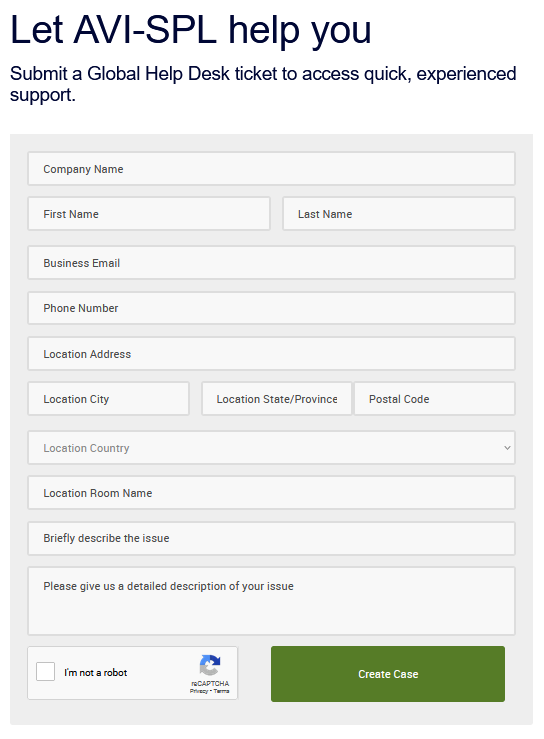
- Click link to the Web Portal
- Click "Submit a help desk ticket" button
- Fill out form with your information while noting the following considerations:
- For Company Name use, University of Colorado Colorado Springs
- For Business Email and Phone Number, use your UCCS contact information
- For Location Address, use 1420 Austin Bluffs PKWY, Colorado Springs, CO. 80918
- For Location Room Name, include Building Name and Room Number (ex: University Center 307)
- In the "detailed description" box please include the service job number referenced above on the first line
- Click the Create Case button
Once you have clicked the "Create Case" button, you will receive a confirmation message on the same page below the form. Additionally, you should receive an email from AVI-SPL support stating that your case has been created. It is advised to additionally, print the page to a .pdf file and save it to your computer so that you have your own copy, and can easily reference the case information.